Artlook uses Google Maps to store and display maps.
Map references are offered in two parts of the application:
- Your own location which can then be displayed on your website (for example on your Contact Us or About Us page)
- A location for a Grouping (such as an exhibition, for example) which will display within Artlook on the Map tab and optionally on a web page
In both cases, the entire “Embed” code is required (in Google Maps, choose Sharing

Then click on Embed map
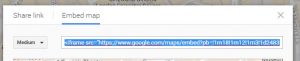
Copy all the blue shaded code and paste it into the Location field in Artlook.
Within Groupings you can also have a named location as well as a map: type in your named location (eg The West Gallery) and hit enter to open a new line. Then paste in the Google Map embed code. That way you will have both a named location and a map.
