[Note that the Editions feature is only available in the Studio version of Artlook]
Any inventory record that you have previously created can be turned into an Edition. Once a record has been converted to an Edition any transactions happen from the listing of all the items within the Edition – there is no limit on how many items are within the Edition but the assumption is that you will be using this feature because you are publishing ‘closed’, numbered Editions.
The master record for the Edition contains the generic information (medium, date created etc.) together with the image. The price of the master record (on the Core Data tab) becomes largely irrelevant since the price used when making sales or consignments is derived from the individual Edition item itself (and can be changed, the Edition items do not all need to be the same price and if you are using a progressive price depending on how many within the Edition are still available this is something you will want to use).
Once you have created your Edition and saved the record, when you re-open the record you will see that there is now an Items tab. This is where you manage the Edition. Also, on the main Inventory screens you will see an indicator showing the remain items available within the Edition.
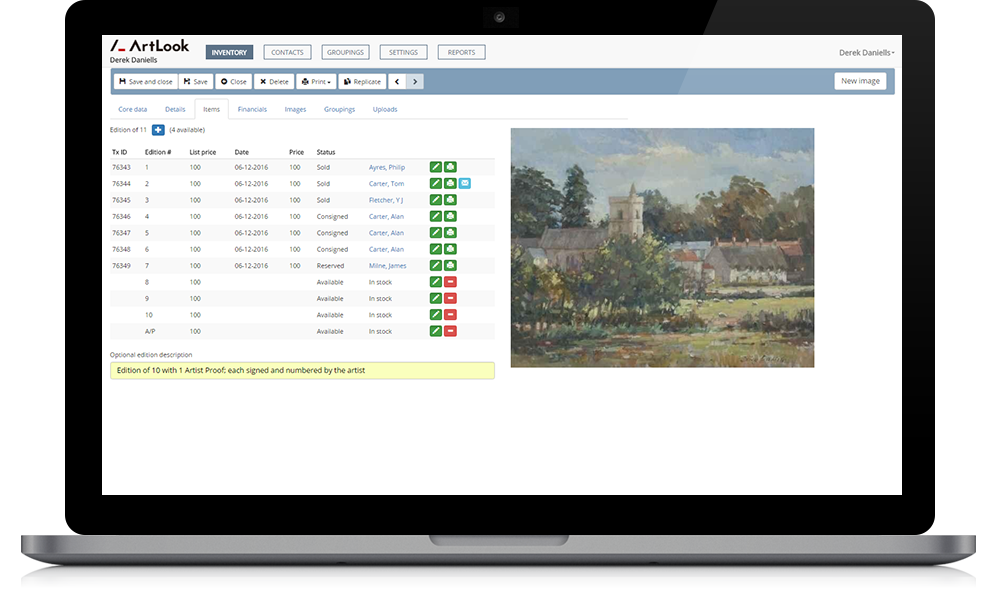
Example of an Edition record showing availability, together with sold and consigned items