Before you can use Artlook you need to set up an account – we offer a full 30 day TRIAL mode which lets you explore all of the features of the system, including those available within the premium ‘Studio Professional’ edition. Your Trial account is exactly what you would experience if you were using the system with a full subscription so it is your opportunity to explore what we can offer, from managing your artwork, your contacts and buyers ….. and, perhaps most importantly for many of you, how you can create and manage your own public website from within the application using our state-of-the-art templates and the many options for different styles and layouts offered by each.
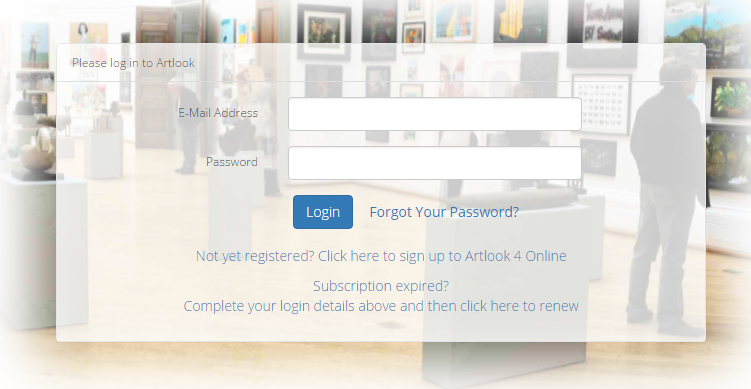
In your browser navigate to the account login page at http://hello.artlookonline.com. If you already have an account you can log in here, but if you are signing up for for the first time you need to click on the Not yet registered? link.
Once you click on the link you will be taken to the sign up page ….. although the sign up page shows the price for our standard subscription, don’t panic! We do not require any credit card details if you are just signing up for a Trial account so fill in your details as described below and take a look at what Artlook can offer
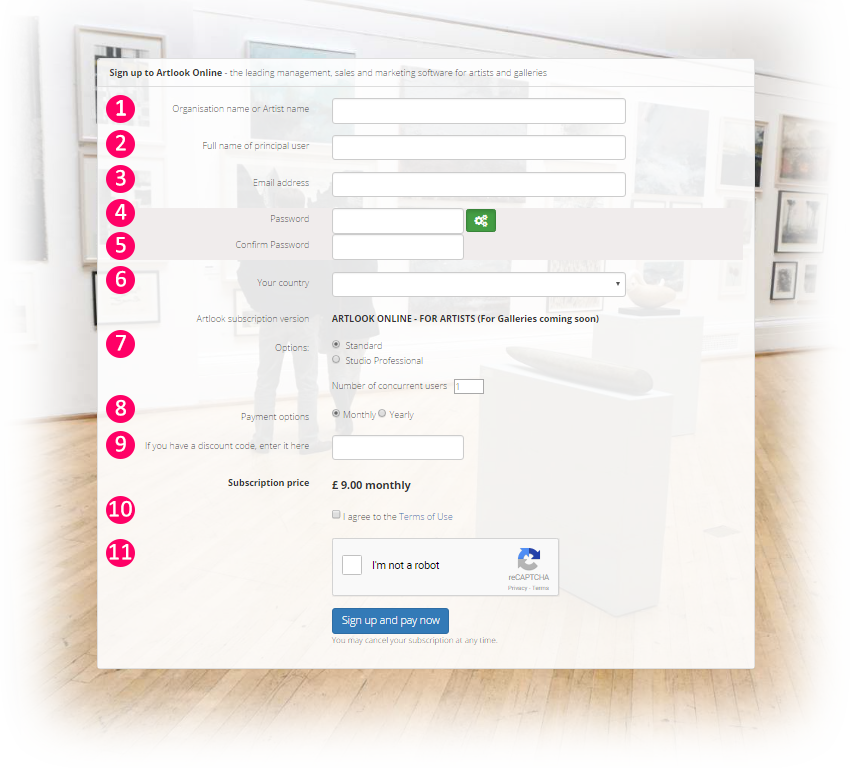
No. 1 – Organisation Name or Artist Name
In this box put how you describe yourself to the world. It could just be your name, John Doe or John Doe Fine Artist or John Doe Studios ….. this is also the name which would appear on your Artlook website. But don’t worry, you can change this at any time.
No. 2 – Full name of principal user
In this box put your name as the user of Artlook … so if your Organisation Name is John Doe Studios, your name here would probably be just John Doe. Artlook allows you to have multiple registered users of one account, this entry is the principal user.
No. 3 – Email address
This is important because you will be using this as your login name, and we will also send information about your account to this address. Make sure it is a currently valid address and you have entered it correctly.
No. 4 – Password
You have two options here – either click on the Password Generator button  or enter your own chosen password. If you use the Password Generator your new password will be displayed and added to the Confirm Password box as well. If you want to use your own Password, enter it here. Your password must be at least 7 characters and include an Upper Case letter as well as at least one numeral – if you are using your own Password re-enter it in the second box – No. 5 – Confirm Password.
Make a careful note of your password, but if you do forget it there is a ‘Forgotten Password’ option on the main login screen where you can re-set it.
No. 6 – Your Country
Pick your country from the displayed list. We like to know where are users are coming from and this helps us to further the develop our features for users wherever they are.
No. 7 – Options
If you are just signing up for the Trial you can ignore this – we will be giving you full access to all options for your first 30 days.
No. 8 – Payment Options
Again, if you are just signing up for the Trial you can ignore this. If you sign up for a full subscription (and we hope you do!) you can opt for a monthly or annual (discounted) payment plan.
No. 9 – Discount codes
If you are signing up for a Trial, type TRIAL in this box and click the the little tick to the right. This will display a confirmation that you are signing up for a free one month subscription. Once you take out a full subscription you will be able to add a relevant discount code here if you have been sent one.
No. 10 – Agree to the Terms of Use
This is the necessary legal bit … you can read our full Terms of Use by clicking on the link. This will open or download a PDF document. Once you are happy just tick the box (you need to do this to enable us to set up your account.) If you want a copy of the Terms you can download it here.
No. 11 – I am not a Robot
This is going to be a tough question if your name is R2D2 or CP30 but for the rest of us just tick the box (this is here to prevent automated ‘bot’ account sign-ups, sadly necessary in this day and age).
And finally click SIGN UP NOW FOR FREE and you’re good to go. If you are using the sign up form to set up a paid subscription or you are upgrading from a Trial account then this button will take you to STRIPE™, our online card payment service, where you can securely enter your payment details.