Artlook is not an email client itself but it can produce email addresses for an email client to use. You can use Outlook or Gmail, or most other standard clients. You can also export to mail services like Mailchimp.
Once you have filtered your contacts to the group you wish to email, choose the Export email (CSV) button near the bottom of the Query Pane:

The arrow to the right of the button drops down some options for you:
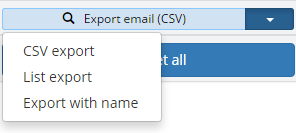
CSV export will just export all the email addresses separated by commas. Most email clients can use this format and you can also pull the result into a spreadsheet if you wish.
List export will put each email address on a separate line.
Export with name will export name => email pairs (eg ‘Fred Bloggs’ => ‘fred@fredbloggs,com’).
If you are not sure which type you need, it is simple enough to try each one in turn and see if it works well or not.