The Contacts 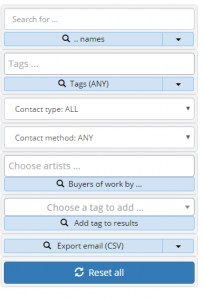 Query Pane allows you to filter the records in view.
The Search function is exclusive – if you search for a record it will ignore all the other options in the pane. The dropdown menu below the search box allows you to specify the scope of your search (names, surnames or ids). Searches are all wild and case insensitive (entering “w” will find all names beginnging with “w”).
All the other options in the pane build up together. If you choose a tag and a contact type for example, only records with both those attributes will be matched and shown to you.
In filtering by tags you can enter as many as you like – the filtering will be on the basis of matching any of the tags (if you have Press and VIP for example, the filter will find records that match either Press or VIP or both).
You can also filter to contacts who have said they only want to be contacted by a certain method (email for example). You can also choose to filter by people who have bought work.
You can add a tag to the results so that you can recall the same set of records at a later date (you could add “January Mailing 2017” for example).
You can also export the email addresses for use with an email client or external mailing service.
The Reset all button will clear all your criteria.