To see the history of transactions (sales, returns, consignments in and out, etc) for a specific item, load the inventory record concerned and go to the third tab (“Items” or “Transactions” depending on which version you have).
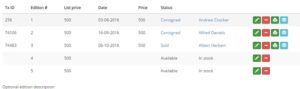
If the item has been transacted the Status column will say “Sold” or “Reserved” or “Consigned”. Click that word, then the history of transactions for the item will appear below. For example, it had been consigned to Customer A, then sold to Customer B you would see a new line for each of those transactions.